Sharing Wifi with NFC tags offers a convenient, secure, and easy-to-use solution for allowing others to connect to your network. It simplifies the process of sharing Wifi passwords and enhances the user experience for those accessing the network.
The advantag
Overall, sharing Wifi with NFC Fridge Stickers offers a convenient, secure, and easy-to-use solution for allowing others to connect to your network. It simplifies the process of sharing Wifi passwords and enhances the user experience for those accessing the network.
If you have an NFC refrigerator magnet, you only need to write the link. When friends come to your home, they can touch the refrigerator magnet with their phone to automatically connect to the Internet. There is no need to enter a complicated password. Connecting to WiFi is that simple. Come and try it!
Step 1 – Open the downloaded NFC software and click Write

Step 2 – Click Add Record

Step 3 – Pull down and select Wifi network

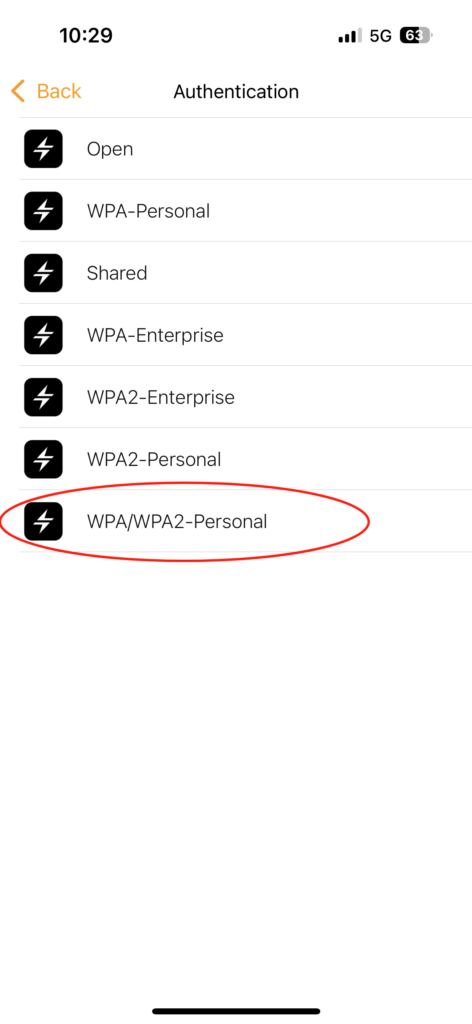
Step 4 – Authentication select WPA/WPA2-Personal
Step 5 – Enter the network information and click OK in the upper right corner

Step 6 – Just bring the NFC tag close to your phone

Step 7 – Stick the fridge magnets on the fridge

Step 8 – Just bring your phone close to NFC Fridge Stickers and you can automatically connect to the network without entering a password.

Here is the video operation.
